

Reviewed by the SEOPointz team · Last reviewed June 2026. We re-ran current Core Web Vitals thresholds and conversion studies before updating this guide. SEOPointz may earn a commission from some links; it never changes what we recommend.
Shoppers decide whether to stay or leave in the first second or two — long before they read your product copy or see your reviews. If your store makes them wait, a meaningful share simply bounce, and Google notices the slow experience too. The good news is that ecommerce speed is one of the few growth levers where the work is concrete and the payoff is measurable. This guide focuses on the specific things that move load times on a real store, and how to tell whether your changes actually helped.
Why milliseconds turn into lost revenue
Speed is not a vanity metric for online stores — it tracks directly to checkout completion. Industry analyses in 2025 found that sites loading in around one second convert at roughly 2.5× the rate of sites that take five seconds, and that even a 0.1-second improvement in load time can lift ecommerce revenue by about one percent. The mechanism is simple: every extra second adds friction at the exact moment a shopper’s intent is highest. When a product page stalls, you are not losing a pageview — you are losing a buyer who was already reaching for their card.
Core Web Vitals: the numbers Google actually grades
Google’s Core Web Vitals give you a shared scorecard. The three metrics that matter are Largest Contentful Paint (LCP), which measures how fast the main content appears; Interaction to Next Paint (INP), which measures responsiveness to taps and clicks; and Cumulative Layout Shift (CLS), which measures visual stability. The widely recommended target for LCP is under 2.5 seconds. That bar is not trivial — reporting through 2025 suggested fewer than half of sites consistently meet all three thresholds — but it is achievable, and clearing it helps both conversions and rankings. Treat these as your pass/fail line and optimize toward them rather than chasing a single big “score” number.
Images: usually the biggest, cheapest win
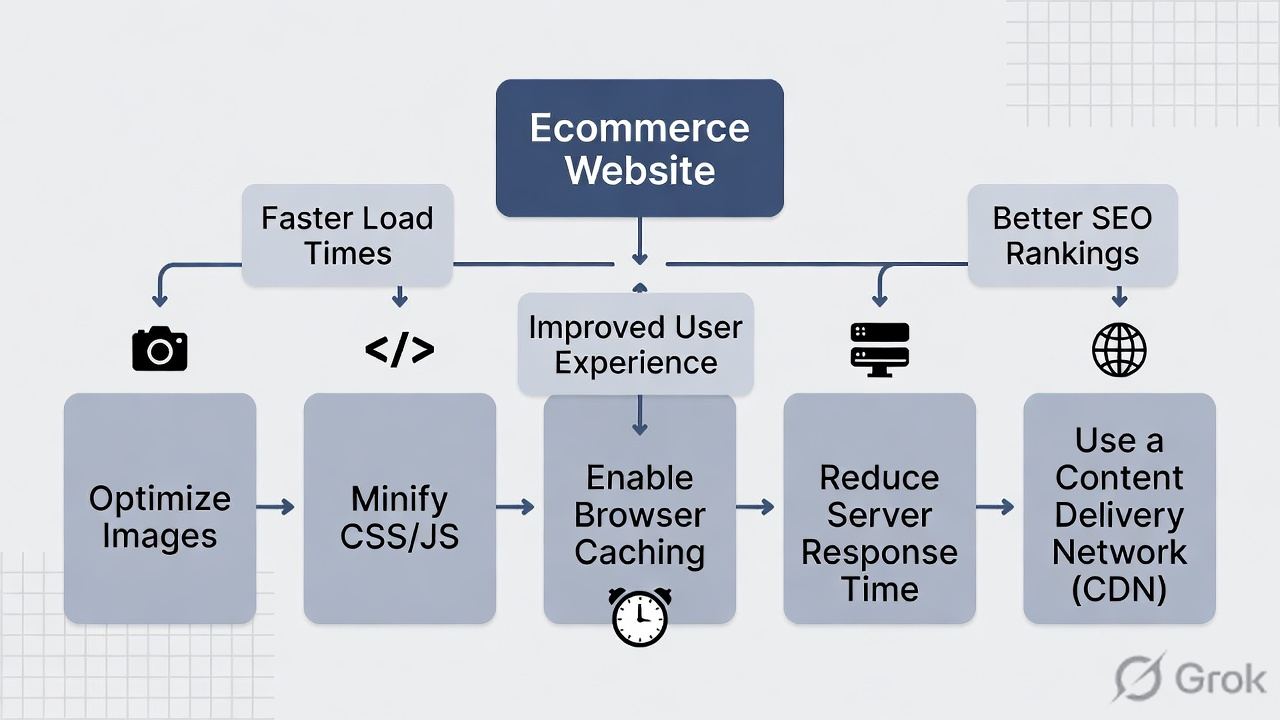
On most ecommerce templates, images are the heaviest thing on the page, which makes them the highest-leverage fix. Three steps cover the majority of stores:
- Serve next-gen formats. WebP offers near-universal browser support with large size savings; AVIF compresses even further and suits photography-heavy catalogs. Converting product images can cut image payload substantially without visible quality loss at a quality setting around 80–85.
- Lazy-load below the fold — but never above it. Defer images the shopper has to scroll to reach, and explicitly do not lazy-load your hero banner or main product image, since those are usually your LCP element.
- Right-size for the device. Use responsive
srcsetso phones download phone-sized images instead of desktop originals.
Done together, modern formats, compression, lazy loading and a delivery CDN can reduce image weight by well over half — the single change most likely to pull your LCP under the line.
Beyond images: hosting, scripts, and a CDN
Once images are handled, the next gains come from the rest of the stack. A content delivery network (CDN) serves files from a location near each visitor and can convert and resize images on the fly, which especially helps higher-traffic stores. Audit your third-party scripts next: chat widgets, review apps, analytics tags and ad pixels each add weight and can delay interactivity, so remove what you do not use and defer what you do. Finally, good hosting and caching matter — a slow server response time (TTFB) caps how fast any page can ever be, no matter how light the front end is.
Measure with the right tools — and the right data
Optimize against real measurements, not guesses. Google PageSpeed Insights is the natural starting point because it reports the same Core Web Vitals Google uses and combines lab data with real-user (field) data. GTmetrix and WebPageTest add waterfall views that show exactly which file is blocking render. One caution: lab scores can swing run to run, so judge changes by field data and median results over time, and always test on a throttled mobile connection — that is closer to how most shoppers actually experience your store.
| Lever | Typical effort | Impact on load time |
|---|---|---|
| Image format + compression | Low | High |
| Lazy-loading below the fold | Low | Medium |
| Adding a CDN | Medium | Medium–High |
| Trimming third-party scripts | Medium | Medium |
| Faster hosting / caching | Medium–High | Medium |
Frequently asked questions
What load time should an ecommerce store aim for?
Use Core Web Vitals as your target rather than a single stopwatch number: keep LCP under 2.5 seconds, INP responsive to taps, and layout stable. Hitting those on mobile is the practical goal, since mobile is where most shoppers and most speed problems live.
Will speeding up my site really increase sales?
The relationship is well documented — faster stores consistently convert better, and even sub-second improvements have been tied to measurable revenue lifts. The size of your gain depends on how slow you are now; sites starting from a poor baseline tend to see the largest jumps.
Do I need a developer to fix this?
Not always. Image optimization, lazy loading and a CDN are available as plugins or built-in features on most platforms. Deeper work — cutting render-blocking scripts or upgrading hosting — benefits from technical help, but the highest-impact image fixes are usually within reach without code.
Speed is only one stage of the buying journey — once a page loads fast, the next questions are how the path to purchase flows and where shoppers drop off. See our guide to ecommerce checkout optimization and our broader playbook on ecommerce conversion optimization.




